

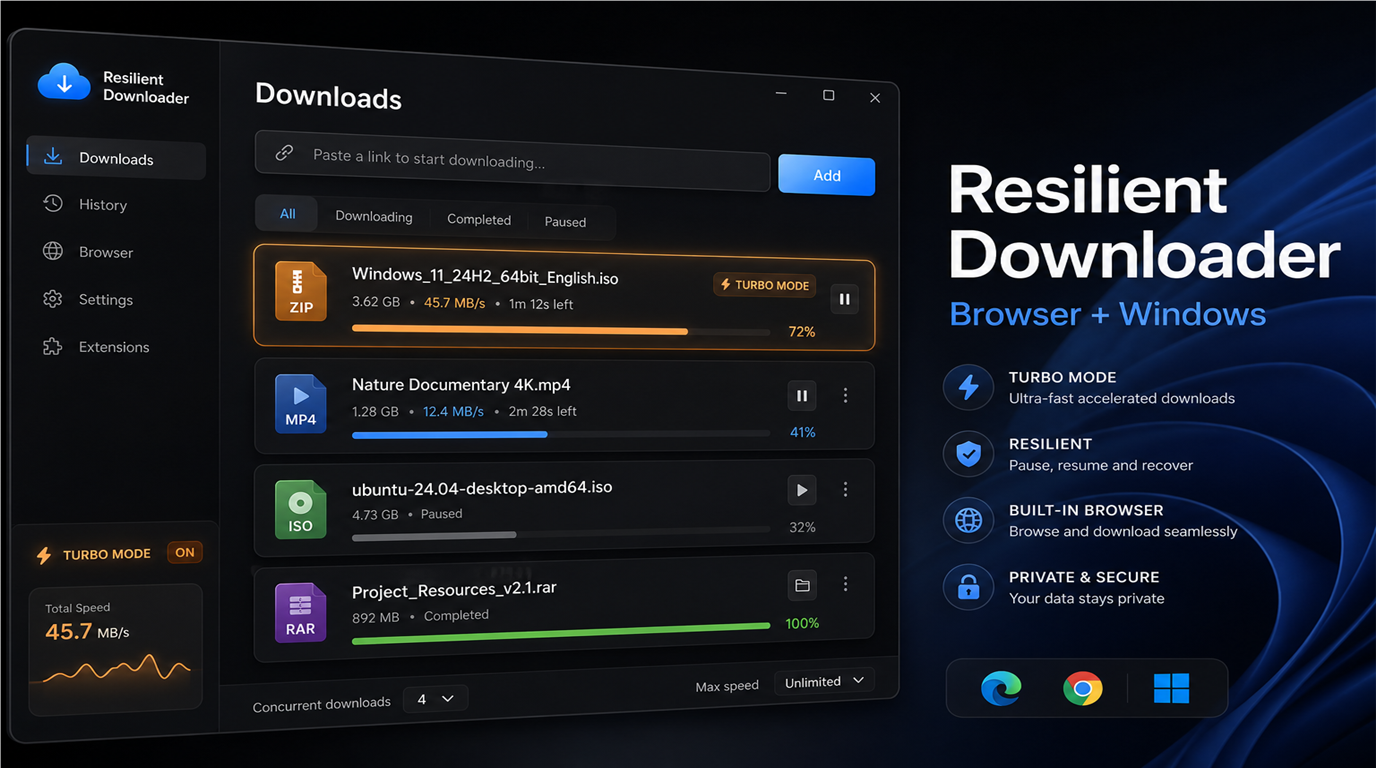
Resilient Downloader — reliable large-file downloads for Windows
You start downloading an ISO image, a multi-gigabyte archive, or a software installer — and halfway through, the Wi‑Fi drops. The browser loses progress, you have to start over, and sometimes you end up with duplicate files named "(1)" and "(2)". Sound familiar?
We built Resilient Downloader — a free Windows app and a set of browser extensions that work together. Your browser hands off the link to the desktop app, and the app downloads the file reliably: with pause, resume, automatic retries, and progress that survives a full PC restart.
The app and all extensions are free.
Why you need this
The built-in browser downloader works fine for small files, but it has limits:
- when the connection drops, progress is often lost;
- large files download more slowly;
- close the browser — the download stops;
- multiple tabs mean multiple independent downloads with no shared queue.
Resilient Downloader addresses all of this. It is a full download manager with a modern Fluent Design interface, built specifically for unstable connections and large files.
The Windows app
Fast multi-part downloads
The app splits large files into parts and downloads them in parallel — faster and more reliable. If the server does not support this mode, a standard single-stream download starts automatically. You do not configure anything manually: the app picks the best approach on its own.
Pause, resume, and retry
Any download can be paused and resumed later — from exactly where it left off, without losing data already on disk. On network errors, the app waits for connectivity to return and retries automatically.
Turbo mode
Need one file as fast as possible? Enable Turbo — the app dedicates maximum resources to the selected task and temporarily pauses other active downloads. Perfect when one file matters most.
Queue and control
- multiple parallel downloads with a configurable concurrency limit;
- filters: all, active, completed, failed;
- pause and resume all downloads with one click;
- details panel: link, path, progress, speed, actions.
Speed limiting
Set a global limit in megabytes per second so downloads do not interfere with video calls or online games.
Progress is saved
All tasks are stored on your computer. Restart the app or Windows — unfinished downloads are restored and continue automatically. You do not lose time or bandwidth.
Beautiful, modern interface
The app follows Fluent Design:
- light, dark, or system theme;
- Windows accent color;
- smooth progress animations;
- UI is multilingual.
Navigation is straightforward: Downloads, Settings, Help, and Feedback — everything is one click away.
Background operation
- minimize to the system tray — downloads keep running while the app is open;
- launch at Windows startup;
- notifications on completion and failure.
More features
- proxy support;
- pre-allocation of disk space when file size is known;
- automatic file name conflict resolution.
The browser extension
Install the Resilient Downloader extension for your browser, and downloads from the web are automatically forwarded to the desktop app.
How it works
- You click Download in the browser as usual.
- The extension intercepts the download.
- The link is sent directly to the app on your computer.
- The browser download is cancelled — the app handles the file.
Everything stays on your computer. Nothing is uploaded to the cloud.
Why app + extension?
- One queue — all files in one place, with pause and resume.
- No duplicates — no more two copies of the same file in your Downloads folder.
- Progress outlives the browser — close Chrome or Edge, the download continues in the app.
- More reliable — multi-part downloads, retries, and saved progress.
The extension is available for Microsoft Edge, Google Chrome, and Mozilla Firefox. After installation, just launch the app — the connection is established automatically.
Getting started
- Install the app from Microsoft Store (link below).
- Install the extension for your browser — Edge, Chrome, or Firefox.
- Launch the app.
- Download — either click Download in the browser or paste a link on the Downloads page in the app.
Everything is free. No registration required.
Download for free
Windows app

Resilient Downloader on Microsoft Store
Browser extensions
 Microsoft Edge ·
  Google Chrome ·
  Mozilla Firefox
Try it today
Resilient Downloader is a free tool from the linecode.pro team for anyone who values reliability and convenience. Install the app, add the extension to your browser — and stop worrying about interrupted downloads.